
VMSpc
Chassis monitoring right on your laptop or tablet.
A vehicle monitoring system on your PC.
With VMSpc you can use your Windows-based PC tablet or notebook to monitor your engine and other chassis data.
VMSpc is an intelligent data translator that links between your USB port and engine diagnostic connector on your rig. Together with the special software, it allows you to read performance and diagnostic information right on your laptop computer. You get complete real-time performance gauges, diagnostics, trip information and graphing system that lets you display any number of parameters at once. You can even store the engine data to a file and load it into a spreadsheet.
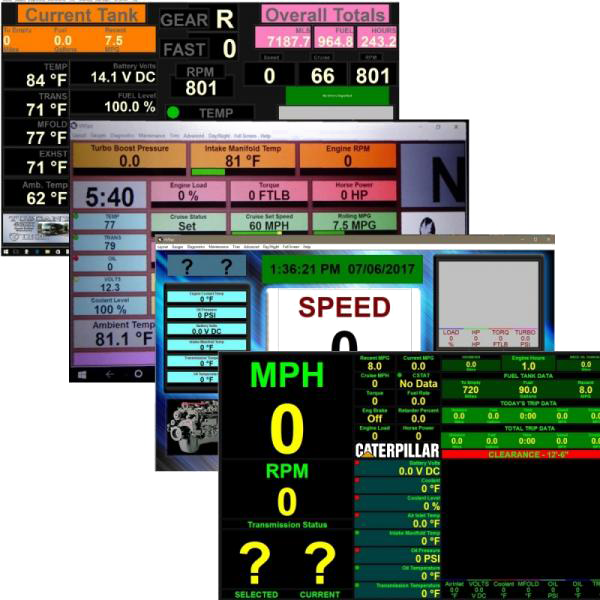
But wait! There’s more! VMSpc lets you program audible alarms based on any engine parameter. For example, you can set it to play any MP3 or WAV file (grab a microphone and record your own!) when your road speed reaches a certain point. Have it played once, once a minute, or continuously. And you can create a “Tank Minder”, which provides a miles-to-empty calculation based on your tank size and fuel economy. VMSpc lets you enter correction factors to compensate for a poorly calibrated engine/ drive train. You can even program gauges to read in metric, if you desire. Professional engineers use VMSpc to test their vehicle designs. Now you can use the same tools to test your coach.
System Requirements:
Windows – Any version except ‘RT’ -Any tablet or laptop produced since 1997 – Available full-size USB-A Port.
This is a product for Windows-Based PCs. It is not Apple or Android tablet compatible. It may be used via VMware Fusion on your Apple notebook or Wine with Linux derivatives, however.
Your VMSpc order includes:
- VMSpc Chassis Interface
- 6-foot USB Cable
- 1 Foot Engine Diagnostic Harness (specify 6-pin or 9-pin)
- CD With Software and Owner's Manual
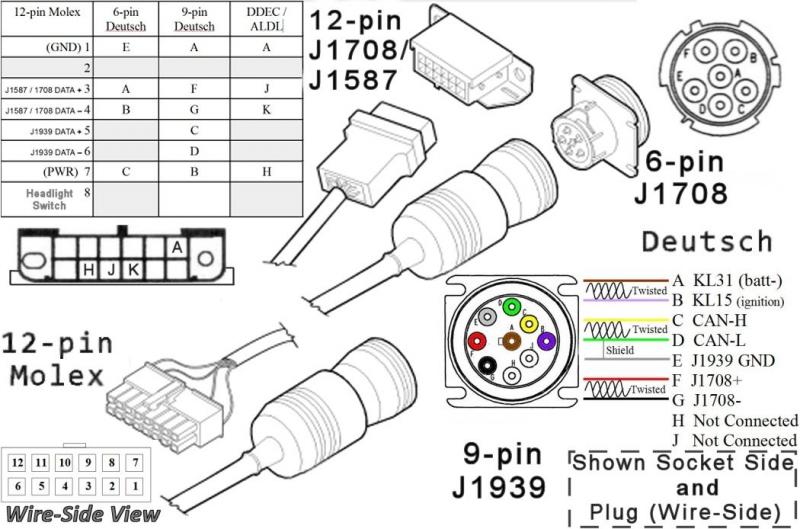
Refer to the following connector guide to identify your diagnostic socket.
VMSpc Downloads
To start a fresh installation, click on VMSpc link below. When first prompted, Open it (don’t download it) –save/copy the Folder to a place on your PC you can find easily, such as c:\ or your Desktop. Install the drivers by (double-clicking on) ‘Install_Drivers.exe’. Once the driver software has completed, install program from that same folder (ex: “Distribution_Disk_v4.0.x”). Reboot, open the VMSpc program with that new desktop shortcut, select your specific engine (when prompted). The first time opening you’ll need to confirm that communications are set; USB JIB etc. Follow the manual on this. Need a hand? Call and we can walk you through.
If you are having difficulty Installing VMSpc v4.x, please refer to our Frequently Asked Questions Page for further information.